The four stages in detail
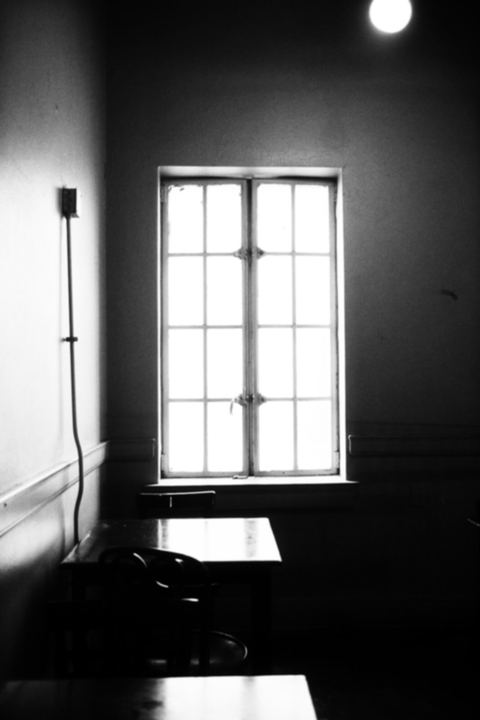
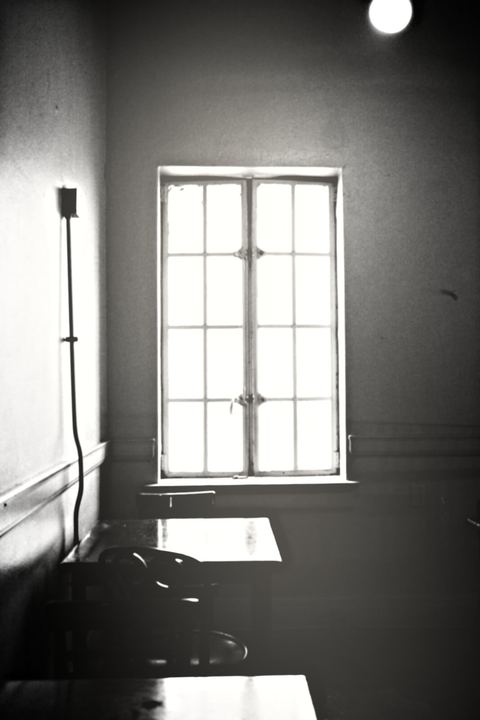
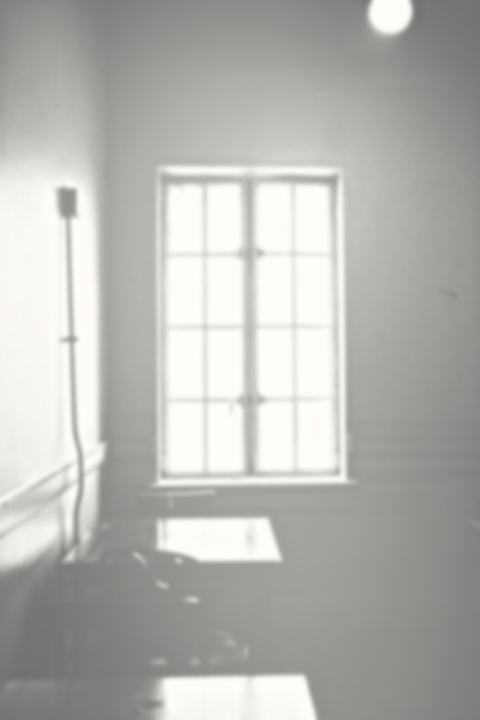
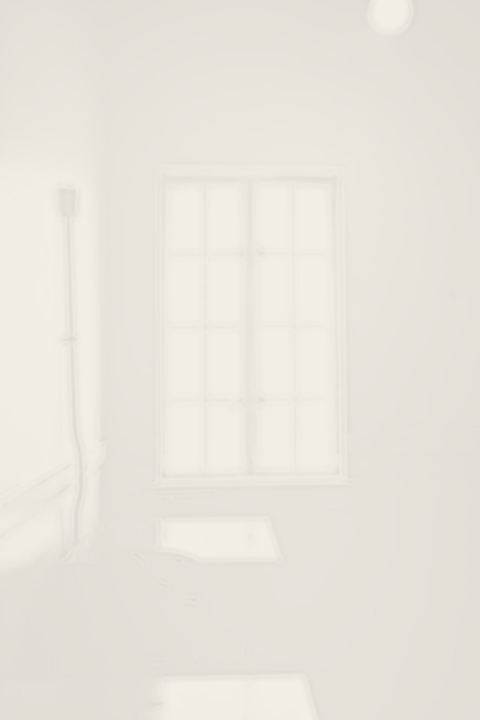
Each button jumps to a fixed point on the slider, and every stage builds on the previous one. Here is the same sunlit room taken through all four.
1. Light
What survives the first pass is contrast and nothing else. Hue is thrown away, then most of the grey band between bright and dark is pushed to one side or the other. A sunlit window stays almost pure white, while a chair in the corner drops to near black. Wallpaper patterns, wood grain and small clutter mostly vanish here, so the photo already reads more like a stage set than a snapshot. Strong, simple shapes come through best; a cluttered desk tends to merge into one dark mass.
2. Caustics
The second pass adds atmosphere. Edges near the brightest area are sharpened so the light seems to vibrate, and two or three enormous, very faint circles of glow are laid over the frame. The largest one sits on the strongest light source in your picture; the others fall roughly where reflected sunlight would land. A slight warm tint creeps into those pools, which is why this stage often feels like late afternoon. Photos with a single obvious window or lamp give the most convincing pools.
3. Reflection
Here objects start to lose their grip on the room. A share of the photo's own negative is blended back in, which pulls dark shapes toward mid-grey and dims the brightest spots slightly, and then the whole picture is raised. Heavy furniture turns translucent, shadows stop anchoring anything, and a gentle blur lets outlines bleed into the wall behind them. Most people stop somewhere around here when they want the room to stay recognisable. Text on signs usually becomes unreadable at this point.
4. Object
The last pass erases nearly everything. Differences in brightness are squeezed to a small fraction of what they were and the whole frame is lifted to a pale, paper-like cream. All that remains is a ghost of the strongest edges: the corner of a window frame, the line where a table met the floor. On a phone screen it can look empty at first glance, and that is exactly the intended effect. Print it large and the faint lines become the whole subject.
What is a still life?
In this context a still life is not a bowl of fruit. It is an ordinary room photographed so quietly that it starts to feel unreal: flat daylight, a wall that is slightly too bright, furniture that seems to be fading out of the frame. The look spread through liminal-space and backrooms communities because it captures a specific feeling — a place that is familiar, empty, and a little wrong. Nothing dramatic happens in the frame, and that stillness is exactly what makes it unsettling.
The Still Life Generator rebuilds that feeling from your own photo in four passes. Light strips the colour and keeps only highlights and deep shadow. Caustics adds soft pools of glow, the way sun bounces off a floor. Reflection inverts and lifts the tones so solid objects begin to dissolve. Object pushes everything toward off-white until only a whisper of an outline is left.
Every pass runs in your browser, so the still life generator works even on a slow connection, and the photo you choose never leaves your device. Drag the slider anywhere between the stages for an in-between mood. For a deeper look at each pass, read how the still life generator works.
When to use this effect
Some kinds of photos respond especially well. Five reliable starting points:
An empty room
A bare bedroom or a freshly painted flat with one window works almost every time. Push to Object and the walls dissolve into cream while the window frame lingers as a faint grid, like a memory of moving day. Rooms without furniture need no other adjustment.
A long corridor
Office or school hallways with repeating doors and ceiling lights are ideal for Caustics. The vanishing point stays sharp, the lights bloom into soft discs, and the far end fades out as if the corridor never actually stops. Shoot from the centre line for symmetry.
A shop after closing
Shoot through the glass of a closed store with the shelves still lit. At Light the products become black silhouettes against glowing displays; slide toward Reflection and the shelves turn ghostly, leaving an eerie, abandoned retail interior. Avoid reflections of yourself in the glass.
An empty swimming pool
Indoor pools, full or drained, have tiles, water reflections and big windows. Caustics exaggerates the shimmering light on the walls, while Reflection melts the tile lines into a hazy, humid blue-grey space with no swimmers anywhere. Night photos with underwater lights work too.
A hospital waiting area
Rows of identical chairs under fluorescent tubes already feel a little uncanny. Stop at Reflection: the seats become pale outlines, the ceiling panels glow evenly, and the room reads like a place where nobody is ever called. Crop out posters with faces first.
One focused tool vs. a general AI image platform
General AI image services are built to do everything, so they ask you to sign up, upload your files to their servers, wait in a queue and usually pay a monthly plan or buy credits. This site does exactly one job. It is free to use without creating an account, your photo is processed on your own device and never uploaded, and each result appears in well under a second instead of after a generation queue. If you want the high-resolution, watermark-free files, you pay $4.99 once rather than every month, and there is a 7-day refund if it is not what you hoped for. The trade-off is scope: you get one carefully tuned look rather than endless styles, which is exactly what keeps it fast, private and cheap.
Questions
Which photos give the best result?
Interiors with one strong light source work best: a window, a lamp, a doorway full of daylight. Rooms with a few simple objects (a chair, a table, a plant) show the disappearance most clearly, because you can watch each shape soften and drift away as the strength rises.
Why does the picture end up almost white?
That is the point of the final stage. Contrast is crushed and brightness is pushed up until only a faint outline remains on an off-white field, like a room remembered rather than seen. If you want more detail, pull the slider back toward Caustics or Reflection.
How do I remove the watermark?
The free download is 1080px with a small text mark in the corner. A single $4.99 payment unlocks 4096px exports with no mark on this browser, and you get a recovery code to restore it anywhere. There is no account and nothing renews.
How is this different from generating an image on NightCafe or another AI platform?
AI platforms invent a new picture from a text prompt, so the room you get is not a real place and the result changes with every run. This tool never generates anything: it transforms the exact photo you give it, with the same result every time you choose the same settings, and it runs offline in your browser.
Am I allowed to use the finished pictures in paid work?
Yes, as long as you own or have the rights to the original photo. Album covers, posters, game backgrounds, client mood boards and products you sell are all fine, and no credit is required. Keep the watermark on free downloads, or use the paid 4K export for anything printed or sold.
If I go too far, can I bring the detail back?
Yes. Nothing is applied permanently while you work: every stage is recomputed from your untouched original, so dragging the slider back down or tapping an earlier stage restores the detail instantly. Only the file you download is fixed, and you can export as many variations as you like.